Pricing Wiki
Good-Better-Best (GBB) Framework
A packaging method that offers 3 clearly differentiated plans to anchor value, segment buyers, and create predictable upgrade paths.
Snapshot
What it is
A tiered packaging pattern (typically 3 plans) that offers a "Good" version (entry-level), a "Better" version (mass-market), and an "Best" version (premium option).
Why it matters
It eliminates the "single-price trap," allowing you to serve budget users while capturing high margins from power users.
When to use
Use this when you have a heterogeneous customer base with varying needs and budgets (2+ meaningful customer segments), typically after reaching Initial Product-Market Fit. Or, when you need an upgrade path without heavy sales involvement.
Key takeaways
Don't price for the "average." One plan over-serves low-end users and under-serves power users—GBB lets each segment pay for what they value.
Start with "Better." Design the middle tier first and make it the obvious default for ~50%+ of your target customers.
Fence hard—or get cannibalized. If "Good" includes everything people need, upgrades stall. Remove premium value drivers (not basic success).
Package first, price second. Lock outcomes and fences per tier, then set the numbers.
Make upgrading feel inevitable. Use "success triggers" (seats, usage, workflows) customers naturally hit as they grow.
On this page9 sections
What is Good-Better-Best?#
Good–Better–Best (G/B/B) is a tiered packaging architecture that bundles features and services into three distinct tiers to target different customer segments with varying Willingness to Pay (WTP).
-
Good: The entry-level option. It meets basic needs and provides minimum viable value for a segment. The goal is to remove the biggest adoption barriers.
-
Better: The mass-market option. Typically the default recommendation. Designed to appeal to the largest segment of customers, often utilizing the "compromise effect" or the "decoy effect" (see Key definitions below).
-
Best: The premium option. Contains all features and services, targeting price-insensitive customers or those with complex, high-value needs.
Key definitions#
-
The Compromise Effect: The consumer tendency to avoid extreme choices (the cheapest/"Good" or most expensive/"Best") and select the middle ("Better") option.
-
The Decoy Effect: When you add a third option that's clearly worse than one tier (but similar in price/features), it makes that tier look like a "no‑brainer," shifting demand toward the intended choice.
-
Price Anchoring: The cognitive bias where the first price a customer sees (usually the "Best" tier) serves as a mental reference point for evaluating the value of subsequent options.
Mental model#
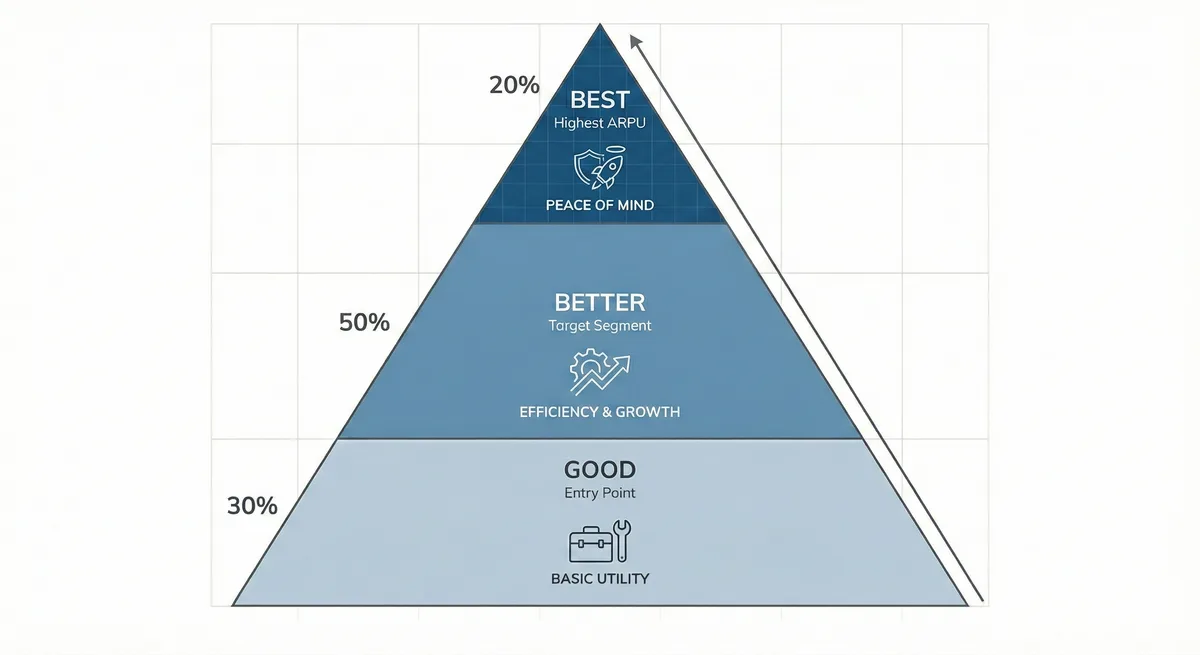
Imagine a Pyramid divided into three horizontal slices:
- Top (Best): The smallest volume of customers but the highest revenue per user (ARPU). Focused on "Peace of Mind" (Security, Scale, VIP support).
- Middle (Better): Most common "sweet spot." This is your target segment. Focused on "Efficiency and Growth."
- Base (Good): The entry point. Focused on "Basic Utility."
Goal: each step adds a meaningful outcome and a clear reason to upgrade.
When should you use Good-Better-Best?#
Decision criteria#
| Situation | Use classic 3-tier GBB? | Better alternative |
|---|---|---|
One clear persona, simple product | ❌ | Single plan (+ add-ons) |
Two strong personas (e.g., SMB vs enterprise) | ✅ | 2–3 plans + enterprise custom |
Many personas / multi-product suite | ⚠️ | Multiple pages/tabs; bundles; a la carte |
Your best customers scale on a measurable metric | ✅ | GBB + usage/seat ladder |
Heavy compliance / security / procurement needs | ✅ | Put trust/compliance in Best (or "Enterprise") |
Rules of thumb#
-
The 30/50/20 Rule: Ideally, your customer distribution should be roughly 30% Good, 50% Better, and 20% Best. If >50% buy "Good," your entry-level product is too rich (you gave away too much value). If <10% buy "Best," your premium differentiation is too weak.
-
The 1x-2x-4x Rule: A common starting ratio for pricing. If "Good" is $10, "Better" is $20, and "Best" is $40+.
Why does Good-Better-Best matter?#
Early-stage startups often underprice because they fear rejection. GBB reduces that pressure by letting you serve multiple willingness-to-pay levels at once—capturing more consumer surplus (what high-value users would pay) without pricing out budget-conscious adopters. It shifts pricing from a single "take it or leave it" number to a clearer "which option fits your needs?" choice.
-
Psychological guidance: With three options, many buyers avoid the extremes and choose the middle tier—so you can design Better to be the default and best-margin package (while still being a legitimate fit).
-
Maximizing coverage: One price forces a binary yes/no. GBB lets Good win price-sensitive buyers while Best monetizes high-value needs (scale, risk reduction, advanced workflows), increasing total revenue across segments.
-
Sales velocity: Tiers standardize the sales conversation. Instead of starting negotiations from scratch, reps qualify needs and map them to a plan (e.g., "If you need X, Better is the right tier"), which reduces friction and speeds decisions.
Key Facts
15% higher ARPU
Companies with two tiers vs one saw about 15% higher ARPU—a direct monetization lift from price anchoring/upsell structure.
Paddle Studios36%
In a study of 50 best‑in‑class SaaS pricing pages, 36% used multiple pricing pages or tabs to handle multiple markets/products.
FastSpring, 2022The "Decoy" Effect
In a famous experiment with The Economist, adding a "decoy" option shifted customer preference for the high-priced option from 32% to 84%.
Ramanujam, M., & Tacke, G. (2016). Monetizing InnovationHow do you implement Good-Better-Best step-by-step?#
Inputs you need#
- Customer segments: Top 2–4 personas (role, company size, use case, urgency).
- MaxDiff Analysis: Survey data to identify which features are "Leaders" (high value) versus "Fillers". (Refer to page Leader/Filler/Killer Features)
- Willingness to Pay (WTP) Data: Run Van Westendorp Price Sensitivity surveys to determine the acceptable price ranges for each tier.
- Jobs to be Done (JTBD): Understanding the specific "job" each segment hires your product to do (e.g., "Maintenance" vs. "Optimization"). (Refer to page Jobs-to-Be-Done)
- Competitor Benchmarking: Map your competitors' tiers. Are they "feature-gating" (Best gets more features) or "usage-gating" (Best gets more seats)? (See Value Metric / Pricing Metric and usage-based pricing.)
Step-by-step
Define your segments
Identify 3 distinct customer profiles. Example: For a CRM, this might be "Solo Founder" (Price sensitive), "Growing Sales Team" (Need efficiency), and "Enterprise" (Need compliance/security).
Pick the "hero" tier and segment intent
Decide which tier you want most customers to choose (often Better) and which segments each tier serves.
Classify your features (The "What")
List every feature and service. Categorize them using Leader/Filler/Killer analysis. Identify the "Fence" features—the specific attributes that a high-value customer must have (e.g., SSO, API Access, Advanced Reporting). These must exclude the "Good" tier.
Design tiers around outcomes + fences
Write 1–2 outcome statements per tier, then add 2–4 price fences (limits, roles, compliance, support) that create real separation.
-
Good (The Anchor): Include just enough value to work (the "point of first demand") but ensure it is slightly inconvenient for a larger customer (e.g., limit users, remove integrations).
-
Better (The Hero): Include the core features most customers need. This is where you want the volume.
-
Best (The Margin Builder): Bundle in valuation-insensitive features like "dedicated support," "audit logs," or "unlimited history".
Engineer the upgrade path
Identify the "limit hits" that signal success and map each to the next tier's unlocked value. (See Laddering for more on designing upgrade paths)
Set pricing
Apply the 1x-2x-4x rule and adjust based on your WTP data. Keep iterating.
Metrics to monitor
Tier Distribution
Upgrade Rate
How quickly do users move from Good to Better? Measure how many customers move from Good → Better over a 12-month period (Laddering velocity)
Downsell Rate
Are users moving from Better to Good? (A sign that "Better" is overpriced or under-featured).
Risks & anti-patterns (and fixes)#
| Pitfall | Fix |
|---|---|
The "Gold-Plating" Trap: Stuffing the "Best" tier with useless features just to justify a high price. | Ensure the "Best" tier solves a high-value problem (e.g., "Compliance" or "Scale"), not just "more widgets". |
The "Good" is too good: Making the "Good" tier so feature-rich that users never need to upgrade. | Apply "Selective Uglification." Intentionally remove a feature (like priority support or SSO) to force the upgrade. |
Feature Shock: Cramming so many features into tiers that customers get confused and don't buy. | Simplify. Focus on the top 1-2 "Leader" features per tier in your marketing. Move everything else to a feature comparison grid below the fold. |
The "Price Cliff": The jump from Good to Better is too expensive (e.g., $9 to $99). | Create a "Bridge" offer or add a seat-based variable to smooth the transition. |
References & Links#
Sources:#
- Mohammed, R. (2018). The Good-Better-Best Approach to Pricing. Harvard Business Review, 96(5), 118-125.
- Nagle, T. T., Hogan, J. E., & Zale, J. (2016). The Strategy and Tactics of Pricing (6th ed.). Routledge.
- Ramanujam, M., & Tacke, G. (2016). Monetizing Innovation: How Smart Companies Design the Product Around the Price. Wiley.
- Ghuman, A. (2021). Price to Scale. Independently published.
Frequently asked questions
01Should I always use exactly three tiers?
No. Use 3 when you have clear "steps" in outcomes. Use 2 for simplicity, 4+ when you have multiple markets or enterprise needs.
02Which tier should be "recommended"?
The tier that best balances margin and broad fit (often Better). Make sure it's a genuinely good deal, not a trick.
03How do I name my tiers?
Avoid generic names like Bronze/Silver/Gold if possible. Use names that describe the customer or the job (e.g., "Starter," "Professional," "Enterprise" or "Maintenance," "Operations," "Management"). This helps customers self-select.
04What if I have a feature everyone wants, but only the "Best" tier pays for?
05What if customers want one feature from Best but nothing else?
Consider an add-on or restructure tiers so outcomes remain coherent.
Author
Dr. Sarah Zou
Independent economist · EconNova
Commercial strategy for technical products, with a focus on pricing, unit economics, and the operating choices behind the model.
About SarahTopics
Cite this page
Suggested citation
Zou, S. (2026). Good-Better-Best (GBB) Framework. In Product, Packaging & Bundling. Pricing & Monetization Wiki. https://sarahzou.com/wiki/pricing/packaging-and-bundling/good-better-best
Open license
Reuse with attribution
This content is available for reuse. When referencing or republishing it, please credit Dr. Sarah Zou and link back to the original source.
Licensed under Creative Commons Attribution 4.0 International. You may share and adapt the material with appropriate credit.