Pricing Wiki
Leader / Filler / Killer Features
A packaging lens that classifies features so you can design high-converting tiers and avoid "feature soup."
Snapshot
What it is
A practical way to sort features into (1) leaders that drive choosing a tier, (2) fillers that make the tier feel complete, and (3) killers that devalue the tier.
Why it matters
Most startups fail at pricing because they treat all features as equal. This framework helps you decide what goes in the "Pro" plan vs. the "Free" plan. Misplaced features can cause plan cannibalization, low ARPA, and feature-bloat.
When to use
Use this during initial packaging design, when launching a new major feature, or when preparing for a price increase.
Key takeaways
Leaders define the Tier: Your "Best" tier should be defined by the inclusion of premium Leaders that high-value customers buy the product for. Leaders should be few, specific, and clearly tied to a segment's job-to-be-done.
Fillers prevent "Nickel-and-Diming": Do not charge extra for Fillers. Include them to add "bulk" and perceived value. Fillers should reduce risk (trust, usability, completeness) but not be your main differentiator.
Killers must be exiled: Killers actually decrease WTP for certain segments and should be removed. If a small group loves the feature, sell it as a separate Add-on.
The goal isn't "more features"—it's a clean upgrade story.
On this page9 sections
What are Leader/Filler/Killer features?#
The Leader/Filler/Killer framework is a method for classifying product features based on customer preference and willingness to pay (WTP). It is used to design product packages that maximize revenue and minimize sales friction.
Key definitions#
-
Leader feature ("hero" or "must-have"): A feature that drives the customer's decision to purchase. It solves the core problem and has high value and high WTP across your target segment.
-
Filler feature ("nice-to-have" or "table stakes / hygiene"): A feature rarely justifies the purchase on its own, but it adds perceived value and makes the package feel "complete." Customers won't buy for the filler, but they feel better about the price because it is included.
-
Killer feature ("cannibalizer"): A feature that actively devalues the product for a specific customer segment. Including a "Killer" can reduce the customer's likelihood of purchase or the amount they are willing to pay because they view it as unnecessary clutter, complexity, or a cost driver they don't want to subsidize.
Mental model#
The "Steak, Bread/Sides, and Coffee"
- Leader (The Steak): The main reason you went to the restaurant. You are happy to pay $50 because you want the steak.
- Filler (The Bread/Sides): You wouldn't go to the restaurant just for the bread, but you expect it to be there. It makes the $50 price tag feel justifiable.
- Killer (The Coffee for a Child): Imagine the "Family Meal Deal" forces you to pay for coffee for everyone, including your 5-year-old. You resent paying for it because your child can't use it. You might walk away and go to a place that lets you buy just the food.
Think of a simple 2×2 grid:
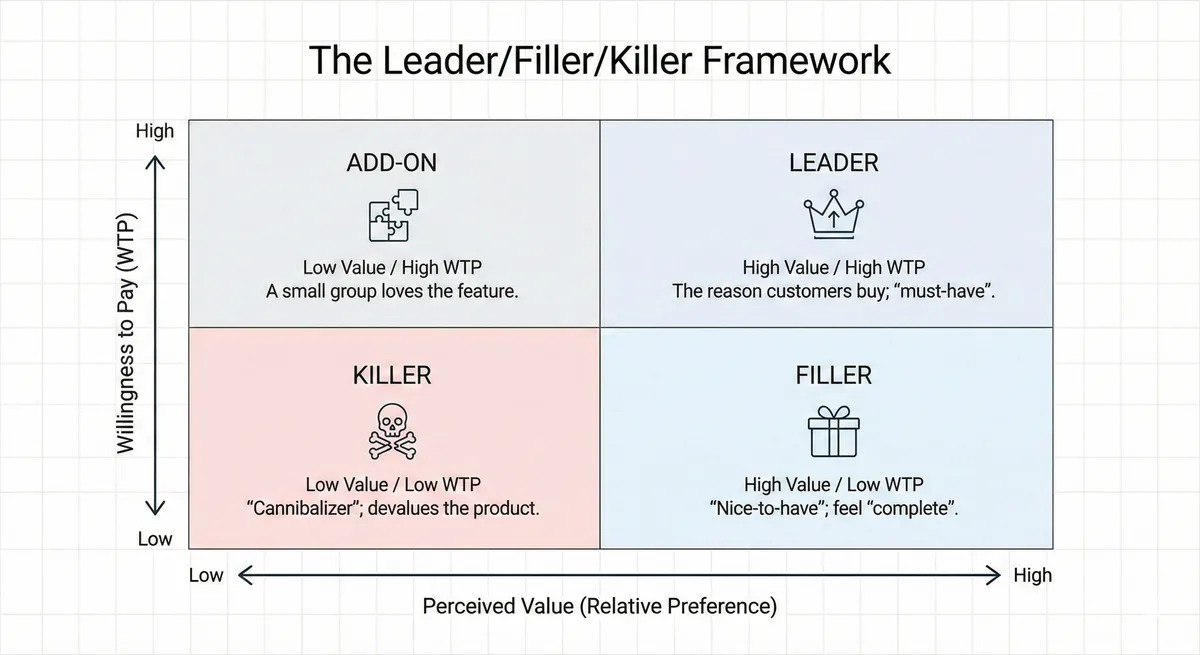
- X-Axis: Perceived Value (Relative Preference) — Low to High
- Y-Axis: Willingness to Pay (WTP) — Low to High
- Leader: High Value / High WTP (The reason customers buy; "must-have").
- Filler: High Value / Low WTP ("nice-to-have"; feel "complete").
- Killer: Low Value / Low WTP ("cannibalizer"; devalues the product).
- Add-on: Low Value / High WTP (a small group loves the feature).
Rules of thumb#
- Leaders per tier: Aim for 1–2 leader features that are unique (or uniquely powerful) to that tier.
- Filler ratio: If your plan page is mostly fillers, you're competing on a checklist and inviting price pressure.
- The 20/20 Rule: A feature is likely a Killer if it is valued by less than 20% of your customers and actively not valued (or seen as worthless) by more than 20%.
- Fence before you ship: Don't release a Leader without an upgrade fence (limits, governance, advanced workflow, risk controls).
Why do Leader/Filler/Killer features matter?#
Without this distinction, founders fall into "Kitchen Sink Syndrome": piling features into one tier, raising COGS and complexity without earning a higher price. The Leader/Filler/Killer lens forces a sharper packaging story—what drives the decision, what rounds out the offer, and what should be fenced or moved up.
Key Facts
12% of features carry the product
Across 615 Pendo subscriptions, an average of just 12% of features generated 80% of daily usage volume — the concentration that makes a Leader/Filler/Killer split possible in the first place. Pendo put the global R&D spend on unused features at $29.5 billion.
Pendo, 2019 Feature Adoption ReportMonetization outranks the other levers
Across 512 companies, ProfitWell found a 1% improvement in monetization — which includes packaging, not just the price point — was 4x as efficient as the same gain in acquisition and 2x as efficient as retention.
ProfitWell / Price Intelligently25% Uplift
A web hosting company increased revenue by 25% simply by removing unwanted features (Killers) from their core package, proving that "less" can be worth more.
Ramanujam & Tacke, Monetizing InnovationWorked example: reclassifying a 40-feature product#
Survey 120 accounts on two questions per feature — would you pay more for this? and would you leave without it? — then cross it against usage data. A typical result:
| Class | Count | Signature | What to do |
|---|---|---|---|
Leader | 5 | High WTP lift, high usage | Tier or meter them |
Filler | 28 | Used, no WTP lift | Keep in base, never headline |
Killer | 7 | Low usage, active friction | Remove or isolate |
Repricing on the leaders. Move two leaders out of Pro ($400/month) into a new Enterprise tier at $900/month. Of 500 Pro accounts, 18% depend on those two features:
- 90 accounts upgrade: 90 × $500 × 12 = +$540,000/year
- Assume 10% of them churn rather than pay: 9 × $400 × 12 = −$43,200/year
- Net: +$496,800/year, from repackaging alone. No new engineering.
The killers are worth more than they look. Three of the seven triggered security review at enterprise buyers — features used by 6% of accounts that were extending the sales cycle for everyone. Removing scope feels like giving something up; Monetizing Innovation documents a web-hosting company that lifted revenue 25% by stripping unwanted features from its core package.
The trap in this exercise is that fillers look like leaders in a survey. Ask "would you pay more" alone and roughly half the catalogue comes back as a leader, because buyers rate features they like rather than features they would fund. The second question — would you leave without it — is what separates them.
How do you implement Leader/Filler/Killer features step-by-step?#
Inputs you need#
- Customer segmentation: 2–4 segments with distinct jobs-to-be-done and budgets.
- Feature list: current + near-term roadmap.
- MaxDiff analysis (Maximum Difference Scaling): A survey method where customers are forced to choose the "Most Preferred" and "Least Preferred" features from a list. This forces trade-offs and clearly identifies Leaders vs. Killers.
- Willingness to Pay (WTP) Data: Data from Van Westendorp surveys to correlate feature preference with price sensitivity.
- Competitive context: common "table stakes" and typical tier fences.
Step-by-step
List and Categorize Features
List all potential features (both current and roadmap). Don't just list technical specs; list benefits/capabilities.
Survey Your Customers (The MaxDiff Method)
Ask customers: "Which of these features adds the most value to your business, and which adds the least?" Get a relative preference score for each feature.
Plot the "Packaging Strategies Matrix"
Create a 2×2 matrix (refer to mental model above).
- X-Axis: Relative Preference (Low to High).
- Y-Axis: Willingness to Pay (Low to High).
- Plot features:
- High Value / High WTP: These are Leaders. Put them in your premium tiers to drive upsells.
- Low Value / High WTP: These are potential Add-ons. Only a few people want them, but they will pay a lot. Sell them separately.
- High Value / Low WTP: These are Fillers. Everyone wants them, but won't pay extra. Include in all plans.
- Low Value / Low WTP: These are Killers. Remove them or offer as a separate add-on.
Construct the Packages
Refer to page Good-Better-Best.
Metrics to monitor
Feature Usage Rate
What % of users in a tier actually use the "Leader" feature? (Should be > 50%). If a feature in your "Best" plan has <5% usage, it is likely a Filler or Killer masquerading as a Leader.
Upgrade funnel
upgrade conversion rate, time-to-upgrade, downgrade rate.
Win/Loss Reasons
If prospects say, "I don't need all that stuff," you have a packaging problem involving Killers.
Risks & anti-patterns (and fixes)#
| Pitfall | Fix |
|---|---|
The "Kitchen Sink" Trap: Engineering teams often want to bundle everything they built. | Use the "20% Rule." If >20% of customers don't value it, cut it from the base package. |
Confusing Fillers with Leaders: Thinking a "nice-to-have" feature will drive upgrades. | Check the MaxDiff data. If WTP is low, it's a Filler. Don't fence it; use it to sweeten the deal. |
Killing a potential add-on: Removing a weird feature that 5% of users love and would pay huge money for. | Don't kill it; turn it into a high-margin Add-on module. |
Leaders that aren't used: Customers pay, then don't activate → churn. | Use onboarding that activates leader features; set success milestones per tier. |
Over-fencing: Feels punitive; customers seek alternatives. | Fence around value (scale, risk, governance), not basic usability. |
References & Links#
Sources:#
- Baker, W., Kiewell, D., & Winkler, G. (2014). The hidden power of pricing: How B2B companies can unlock profit. McKinsey & Company.
- Ghuman, A. (2021). Price to Scale: Practical Pricing for Your High Growth Software Startup. Independently published.
- Gourville, J. T., & Soman, D. (2018). The good-better-best approach to pricing. Harvard Business Review, 96(5), 118–125.
- Nagle, T. T., Hogan, J. E., & Zale, J. (2016). The strategy and tactics of pricing: A guide to growing more profitably (6th ed.). Routledge.
- Ramanujam, M., & Tacke, G. (2016). Monetizing innovation: How smart companies design the product around the price. Wiley.
Frequently asked questions
01How many leader features should a plan have?
Typically 1 or 2. If you have 5 Leaders in one tier, you are likely leaving money on the table and increase the chance you create a killer in a lower tier.
02What if a feature is both table stakes and a leader?
Provide the basic version everywhere (filler) and gate the advanced version (leader) via limits, governance, or scale.
03What do I do if a feature is a Leader for one segment and a Killer for another?
04How do I identify a "Killer" without a survey?
Listen to sales calls. If prospects ask, "Can I get a discount if I remove X?" or "We won't use X, why are we paying for it?", then X is a Killer.
05How do I test if a feature is a leader vs filler?
06How often should we reclassify features?
At least quarterly for fast-moving SaaS or whenever you release major capabilities; leaders often become fillers over time.
Author
Dr. Sarah Zou
Independent economist · EconNova
Commercial strategy for technical products, with a focus on pricing, unit economics, and the operating choices behind the model.
About SarahTopics
Cite this page
Suggested citation
Zou, S. (2026). Leader / Filler / Killer Features. In Product, Packaging & Bundling. Pricing & Monetization Wiki. https://sarahzou.com/wiki/pricing/packaging-and-bundling/leader-filler-killer-features
Open license
Reuse with attribution
This content is available for reuse. When referencing or republishing it, please credit Dr. Sarah Zou and link back to the original source.
Licensed under Creative Commons Attribution 4.0 International. You may share and adapt the material with appropriate credit.